Monday, May 3, 2010

Lego Block Render


Final render of my Lego Blocks.

Not to self, rename EACH single mesh, and stay away from smooth rendering.

Wednesday, April 14, 2010

Operating Systems

Questions:

1. What is an operating system and what is its purpose?
software that controls the execution of computer programs.

2. What operating system do most computers come preloaded with?
Usually windows 7, and leopard on macs.

3. Besides personal computers, what other devices have operating systems?
Cell phones, ipods, and many other mobile systems.

4. Do all computers have operating systems? Explain
an os usually comes preloaded with an OS, however, a computer can exist without an os, take a calculator for example.

5. What are the three most common operating systems? Are there other operating systems? Explain.

Windows
Linux
Mac OS X

there are many others that are usually variations of Linux. Also, Google chrome OS just came out, so the battle for OSes has just begun.

6. What is one reason why operating systems are coded rather than physical circuits?
so that it can be easily upgraded and fixed.

7. What are the two main functions of an operating system?
controls the allocation of hardware resources, and controls the execution of programs.


8. What are the four types of operating systems?
Real time
Single User, Single task
Single User, Multi task
Multi User


9. What are the first actions the computer takes when you power it on?
"Boots Up", starting the OS.

10. What is the bootstrap loader? What is its function?
to load the Operating system.

11. How does the OS manage the processor?
the OS uses the system kernel that helps bridge connections with software and hardware in order to manage the system's resources

12. What does an operating system do when two processes are multi-tasking?
It manages system resources for both of them to run at the same time. However, the OS keeps running the tasks until the processes are "waiting"

13. What is thrashing?
A term used when more and more computer resources are being used in order to do less and less tasks.

14. What is virtual memory management?
"Tricks" the program into thinking that there is additional memory. However, this memory is physically allocated and could result in an overflow on the hard drive.


15. What is a driver?
A program the tells the computer how to interact with a peripheral device.

16. How can input/output capabilities of a system be enhanced?
getting a better more efficient central processing unit.

17. How do application program interfaces make it easier for programmers?
Helps the user easily interpret how to use the program visually.


18. What is a UI and GUI?
UI = user interface
GUI = graphical user interface

19. Why is Linux being open source significant?
Can be modified to will. Also, allows many bug fixes to occur faster.


20. What are some other devices that run on Linux?
Tivo, Linksys routers, and some mobile devices.


21. What are 3 things you found interesting about operating systems that you did not know before?

I did not know that many other devices such as Tivo and linksys routers run on Linux.

I also didn't know there were 4 different types of Operating Systems.

I also found it interesting that there are only 4 main operating systems that people use.


22. What is a question that you still have about operating systems?

With the emerging operating systems, how will program functionality and technological advances hinder the development of operating systems?

Monday, April 12, 2010

Networking

LAN - Local Area Network:
a network that is confined to a relatively small area.

Examples: Home networks, LAN Parties, etc.

WAN - Wide Area Network:
a network that connects major businesses, corporations or organizations in a relatively large area.'

Examples: Government networks, School network, etc.

-------------------

Unshielded Twisted Pair Cable - about 100 meters
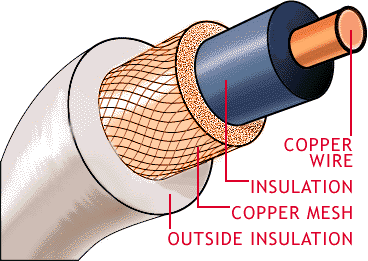
Coaxial Cable - about 1000 feet for SD broadcasts. 300 feet for HD
Fiber Optic Cable - about 2000 meters.

----------------------

Router - Bridges connections within a network. "Translates" information into a usable network connection.

Bridge - Enables communication between devices on a network, and combines them to other networks

Switch - Allows peer to peer connections with devices on a network.

------------------------

Peer to Peer : it enables users to share files with each others computers. Limewire or any other peer to peer downloading client is an example.

usually cheaper, but relies on the security and speed of each others computer. Can have latency issues.


Client / Server : Uses a dedicated file server for functions in a network.
Download sites such as megaupload, mediafire are examples.

Usually more reliable, and faster, however it's pretty expensive and needs to be maintained.

Friday, March 26, 2010

Building or Buying

Give three advantages to building a PC and three advantages to buying a PC.

Buying:

Convenient - Saves time. It allows you to buy a preconfigured system that contains all the components inside.

Bundled with OS and other software - Usually is bundled with an Operating System and some software. Usually the software can range from a multimedia player to antivirus.

Warranty and support - Most computers come with warranty, so if your computer breaks down, or you just have trouble with a certain component, you can easily call up tech support or bring it back to the store for some help.

Building:

Cheaper - Cuts out the middle man, so that when you're buying specific parts, you're not also paying for the license for that company to use it on their computer system. Also, you pay for what you need, so this allows people to get the only things they need for their computer at a cheaper cost.

Customizable - You get what you want. All the components are bought and installed by you, so that you're putting in what you NEED in. With this route you have a wide selection of different parts for different tasks, like graphics cards for example. You wouldn't really need a high end QUAD SLI Nvidia graphics card if you're just using the computer to go on Facebook and play the occasional Farmville or other flash game timewaster. However if you're a gamer and you're not on a budget, GO FOR IT!

Satisfaction - Building a PC is a valuable learning system. Also, the satisfaction of building something from scratch and having it work is a great feeling.

------------------

I believe building your own computer is the best option. However, it's not the best for most people. to build a computer, you must have a vast knowledge of computer components and electronics experience. You must know what plugs in to where, if it's compatible, what the parts are for, the power supply, etc. Nonetheless, building a computer is usually cheaper as it cuts out the middle man, and it doesn't leave your computer with "bloatware" that's usually bundled with preconfigured system. You may have to pay for your OS, but it's a nice fresh install instead of having all that bundled junk that HP users usually have. Also, with building your own computer, you get to have what you want, meaning that you can customize every single aspect about your computer. Building could take a lot of time, but it's cheaper and rewarding in the long run.


Mark Kyrnin Building Vs. Buying a Personal Computer [Online]Available http://compreviews.about.com/od/general/a/BuildvsBuy.htm Accessed March 26, 2010

Thursday, March 25, 2010

Introduction to Computer Systems

What do you already know about computer systems?

I know quite a lot about computer systems, having used Windows 98/ME/XP/Vista/7 since I can remember and of course, troubleshooting many PCs and laptops that my relatives have told me to fix.

What do you want to learn about computer systems?

I want to learn more about the internal components of the computer, while I do have knowledge of the parts and what it does, I want to learn how to build my own computer, and learn how to do advanced stuff like BIOS editing.


1. What is the tower? - What does it look like? - What is its function? A tower, shown here, is an enclosure that houses the internal parts of a computer. These parts could range from the Hard Drive, CPU, fan, etc.


2. What is RAM? - What does it look like? - What is its function? - What does RAM stand for?

RAM stands for Random Access Memory which allows the computer to perform processes that require it to access and save memory randomly.


3. What is a Hard Drive? - What does it look like? - What is its function?

A hard drive is a disk drive that holds and stores information on a magnetic or optical disk that reads and writes information on it.


4. What is a DVD and DVD drive? - What do they look like? - What is their function?

a DVD usually stands for Digital Versatile Disc which allows people to store large files on a disk. A DVD drive allows a computer to "accept" and interpret information on a DVD.


5. What is a Ethernet cable? - What does it look like? - What is its function?

An Ethernet cable looks like an oversized phone cable, which is used for Local Area Networks and connecting to your modem or router.


6. What is a motherboard? - What does it look like? - What is its function?

A motherboard is the primary circuit board that "holds" and allows connections to necessary computer interfaces.


7. What is an IDE and SATA cable? - What do they look like? - What is their function?

Both are different ways for connecting a Hard Drive to the motherboard.


8. What is USB? - What does it look like? - What is its function? - What does USB stand for?

USB stands for Universal Serial Bus allows many computer peripherals, such as a mouse, keyboard, printer, etc. to be connected through a "universal" input.


9. What is a video card? - What does it look like? - What is its function?

A Video card is responsible for generating and outputting images to display. Some video cards also support video capturing, allowing you to record videos on your computer.


10. What is a PCI card? - What does it look like? - What is its function? What does PCI stand for?

a PCI card could be many different computer peripherals, such as a network card, sound card, video card, usb ports, etc. They all are able to connect through the motherboard using a PCI system.

Thursday, March 4, 2010

Magazine - GQ


The Images I only used 3 different images.

2 of them was my recent picture from the Snowball formal dance.

and the other was the GQ logo, which can be found here:

GQ Logo (Online Image) Available http://www.mavenmedia.co.za/images/gq_logo.jpg, March 3rd, 2010

to summarize, I did many things on this image.

First, I carefully cropped Camden and myself from our formal pictures, and placed it in a blank transparent new image.

Then, to match GQ's style, I added a gray background and tried making our bodies blend in with the background seamlessly.

then I added the GQ logo and change the colours to match what we were wearing and the overall colour scheme of the magazine.

Finally, I then added some finishing touches, such as different article titles, and "hooks" in the GQ style. I went through many of these magazines in order to fully emulate what their style is.

For some text, I added some glows in order for some more clarity around the dark areas of the magazine. however, due to jpeg compression it seems like the text still looks a bit blurry still...

I chose GQ because I like their colour themes on their magazines. Also, I've seen quite a lot of celebrities that has been on the covers of GQ.

Monday, March 1, 2010

CD Cover


Alright, here's my CD Cover:

Images I used:

Flame (Online Image) Available http://grace-stock.deviantart.com/art/Flame-Stock-III-106713035 December 18,2008

Rick Astley (Online Image) Available http://mddpartycrew.files.wordpress.com/2009/06/picture-2.jpg March 1,2009

I believe I deserve a 4 because I used quite a lot of effects using minimal images.

The Artist name was inspired by a famous move by the Character called Akuma from the Street Fighter videogame series.